Single Sign-on vs. Federated Identity Management: The Complete Guide

Sep 19, 2024
-minute read
Director, Product & Solution Marketing

What is Single Sign-on (SSO)

Single sign-on, or SSO, allows a user to access multiple applications using a single set of credentials. This capability can be applied to both employees and customers to streamline their login experiences. Typically, employees sign on to multiple business applications to do their jobs, including messaging and email accounts, HR functions, intranet sites, financial records, etc. Additionally, customers experience smooth and secure access across a brand’s digital touchpoints, like their website and mobile app. With SSO, users can access everything they need with one set of login credentials, without having to remember and enter a unique password for each service.


Customers often access multiple services or applications through one business account or portal. As shown in the diagram below, SSO makes it possible for bank customers to sign on with a single set of credentials and perform a variety of actions, like checking their account balance and transferring money. Even if these services are actually separate applications managed by the bank behind the scenes, SSO provides customers with a seamless experience across these interactions.
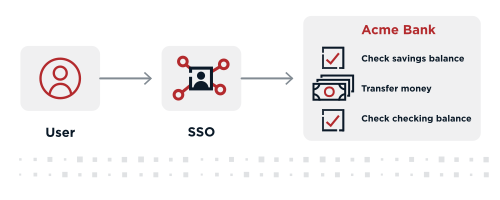
A diagram depicts a flow from the user to SSO and then to capabilities at Acme Bank including check savings balance transfer money and check checking balance

How Does SSO Work?

SSO leverages centralized authentication, meaning all enterprise and third-party apps are accessed through a single service that confirms a user’s identity through a set of credentials. If the user is not already authenticated, here’s how the sign-on process works:


  • Step 1: The user navigates to the website or application (the service provider or SP) they want to access.
  • Step 2: The SP sends a request and redirects the user to the SSO system (the identity provider or IdP).
  • Step 3: The user is prompted to authenticate by providing credentials required by the IdP, such as a username and password, a passkey, or a form of multi-factor authentication (MFA) like a fingerprint or facial recognition.
  • Step 4: In Security Assertion Markup Language (SAML) 2-based SSO systems, once the IdP validates the user's credentials, an assertion is sent back to the SP to confirm successful authentication.
    • In OpenID Connect (OIDC)-based SSO systems, an identity token and an access token are returned to the user’s browser.
    • This identity token allows the user to access other applications within the SSO environment without needing to re-enter their credentials.
  • Step 5: The user is then granted access to the desired application.

Once this process is complete, the user authentication is performed, and other SPs accessed by the user will confirm their authentication with the IdP.
What is Federated Identity Management (FIM)?

Federated identity management (FIM), also known as federated SSO, refers to the establishment of a trusted relationship between separate organizations and third parties, such as application vendors or partners, allowing them to share identities and authenticate users across domains. When two domains are federated, a user can authenticate to one domain and then access resources in the other domain without having to perform a separate login process. This is sometimes referred to as cross-domain SSO.


FIM is achieved through the use of standard protocols like SAML 2, OAuth 2.0, OIDC, and System for Cross-Domain Identity Management (SCIM). These open standards enable the secure transmission of authentication and access information across domains. As a result, a user can sign on once and gain access to applications and systems across all federated domains. Essentially, federated identity management enables SSO across company lines.


How Does Federated Identity Management Work?

There are several federated identity workflows, but a common setup is for one organization to serve as the IdP using an identity and access management (IAM) platform, where a user’s identity information is stored. The IdP establishes a trusted relationship with service providers (SPs), which are outside the security domain of the original organization.


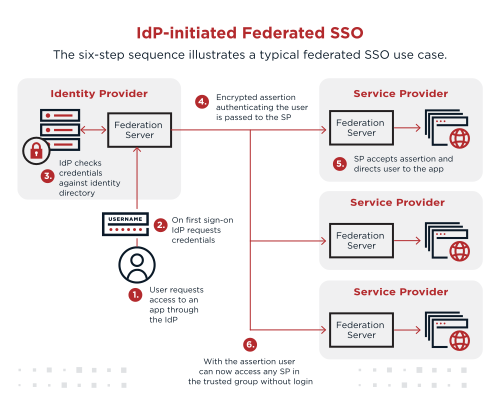
For example, an employee’s organization might be the IdP, and the third-party apps they use to do business are SPs. The diagram below illustrates the six-step sequence for this use case.


  1. The employee requests access to an app through their organization (the IdP).
  2. The IdP requests the employee’s credentials.
  3. The IdP authenticates the employee’s identity using stored data created when the user set up their account or joined the organization.
  4. When the authenticated employee tries to access one of the third-party apps, the SP sends a request to the IdP.
  5. The IdP indicates that the user has been authenticated and has permission to access that service, usually through a SAML 2 assertion or other protocol.
  6. The employee proceeds without needing to sign in again.
A diagram depicts IdPinitiated Federated SSO with a sixstep sequence illustrating a typical federated SSO use case The steps are as follows 1 User requests access to an app through the IdP 2 On first signon IdP requests credentials 3 IdP checks credentials against identity directory 4 Encrypted assertion authenticating the user is passed to the SP 5 SP accepts assertion and directs user to the app and 6 With the assertion user can now access any SP in the trusted group without login

Federated Identity vs SSO

Although you may hear SSO and FIM frequently used together, they are not synonymous. Single sign-on enables access to applications and resources within a single domain. FIM enables SSO to applications across multiple domains or organizations.


For example, FIM is necessary for an organization to give employees one-click access to third-party applications like Salesforce, Workday, and Zoom. Using our financial services example from before, FIM allows bank customers to seamlessly access services that are externally managed, like ordering checks, sending money via Zelle, and applying for a loan.

Benefits of SSO

SSO offers a range of benefits for organizations looking to provide secure and simple access to apps—anytime, anywhere. Below are a few of the key ways SSO can positively impact your business:


Stronger Security

Since passwords are a popular attack vector, reducing reliance on them also reduces the potential for a breach. Asking users to only remember one password also decreases their tendency for risky password behavior, such as reusing passwords, writing them down, or sharing them with others.


Enhanced User Satisfaction

Users can log in once and quickly access the resources they need, enhancing their overall experience with your organization. SSO is essential in delivering a seamless journey for both employees and customers by reducing the number of clicks and cutting down the time required to reach your products, services, and applications.


Improved Employee Productivity

SSO gives your employees easier access to the resources they need to do their jobs. By making access faster without sacrificing security, you’re streamlining their experience, giving them more time to focus on important tasks.


Lower IT Costs

Decreasing the number of passwords also decreases the number of help desk tickets due to password-related problems. Fewer password resets may not sound like a big deal, but some organizations budget millions of dollars annually for password-related support costs alone. Minimizing the number of passwords in use can significantly impact your bottom line.


The Essential Guide to Single Sign-on

Benefits of FIM

Federated Identity Management (FIM) offers a range of benefits for businesses looking to streamline access, improve security, and scale across complex environments. Below are some of the advantages and critical areas of impact:


Cross-Organization Access

FIM simplifies secure access between multiple organizations, allowing users to leverage a single set of credentials to access services across different entities. This seamless cross-organization access reduces friction for users, improving their experience, while ensuring security controls are maintained across systems.


Multi-Domain Collaboration

In environments where multiple domains or business units must collaborate, FIM enables secure data sharing and authentication across systems without the need for duplicate credentials. It facilitates efficient communication and resource access between distinct domains, ensuring collaboration and security.


Reduced Dependency on Internal IT Resources

FIM reduces the burden on internal IT teams by enabling automated, secure access between organizations. As authentication and access management tasks shift to external identity providers or partners, internal resources are freed to focus on strategic initiatives, rather than managing user credentials and access requests.


Scalability Across Global Networks

For enterprises operating on a global scale, FIM provides the necessary infrastructure to manage identity and access across multiple regions. It supports the scaling of operations without the need for complex, localized identity systems, making it easier to maintain consistency in identity management practices across a distributed network.


Efficient Partner Integrations

Integrating with partners and third-party service providers becomes more efficient with FIM, as it streamlines the process of connecting external applications and services. With FIM, businesses can quickly onboard new partners, while ensuring security protocols are upheld, reducing the time it takes to establish secure integrations.


Enabling Cloud and Hybrid Environments

As more businesses adopt cloud and hybrid environments, FIM supports secure identity management across both on-premises and cloud-based systems. FIM ensures that regardless of where applications or services are hosted, users can securely access them using their existing credentials, creating a consistent experience across the entire IT landscape.

Which Solution is Right for You?

When choosing the right identity solution for your organization, it's important to consider factors like size, resources, complexity, and future scalability. Depending on your needs, standard SSO may be sufficient, but enterprises or businesses with extensive third-party services or partnerships may benefit more from FIM, due to their need for user access across organizational boundaries.


Here are some things to consider when deciding which solution is the right fit:


Size and Complexity


  • Organizations providing a range of services across organizational, and even national, borders, may need FIM. This is because FIM enables large enterprises to quickly integrate third-party services, while allowing customers to continue to use existing credentials. FIM provides the flexibility needed to take advantage of opportunities, differentiate from competitors, and provide seamless access.
  • Those only providing first-party services may opt for standard SSO. Consider using a solution that supports industry-standard protocols used for FIM, because it will give you the ability to take advantage of protocol innovation and enhancements, as well as add flexibility to set up FIM later, should the need arise.


Number of External Applications and Vendors


  • For organizations frequently using external services, federated identity may be the better option. For instance, those leveraging third-party SaaS services (e.g., Salesforce, Zoom, Workday) will require FIM capabilities to securely integrate with your providers and provide seamless access to those applications for their employees.
  • On the other hand, standard SSO can provide rapid time-to-value for organizations with a small number of first-party applications.


Security Requirements


  • For organizations with high compliance and security demands, federated identity offers stronger controls for managing access across domains. Avoid legacy protocols, and if your applications can’t support them, consider using integration technologies to limit their impact.
  • Standard SSO may provide a high degree of policy control, while FIM may require more coordination across organizational borders in establishing policies and agreements.


IT Resources and Budget


  • Federated identity may require more technical infrastructure and resources, while standard SSO is typically more straightforward to implement.
  • If your business and IT strategy involves third-party providers and needs to support a rapidly changing business environment, consider FIM and possible partnerships with system integrators that can quickly onboard applications, should internal skills and resources not be available.
  • Standard SSO can serve as a quick and cost effective way to enhance the user experience, improve security, and address some low-hanging-fruit cost savings, such as help-desk-assisted password resets.


User Experience Goals


  • Federated identity provides seamless access for users interacting with multiple external services, while standard SSO simplifies internal logins. Whether you use FIM or standard SSO, the user experiences will be enhanced by a simplified login process, positively impacting overall satisfaction and productivity.
  • With standard SSO, the IAM team can easily standardize login journeys and MFA options, simplifying the overall experience. With FIM, the organization responsible for the IdP may need to coordinate closely with the service providers (applications) to ensure user experiences are consistent.


Future Scalability Needs


  • Federated identity might be better for companies planning to expand partnerships or work with more external services over time as their organization grows.
  • If your long-term strategy includes integrating additional third-party services, either to support expanded business operations or to offer new products and services, FIM is likely the best option.

SAML 101


Learn more about federated identity management and why SAML has emerged as the primary identity federation standard.

Share this Article:
Related Resources

Start Today

See how Ping can help you deliver secure employee, partner, and customer experiences in a rapidly evolving digital world.